Showing posts with label Android. Show all posts

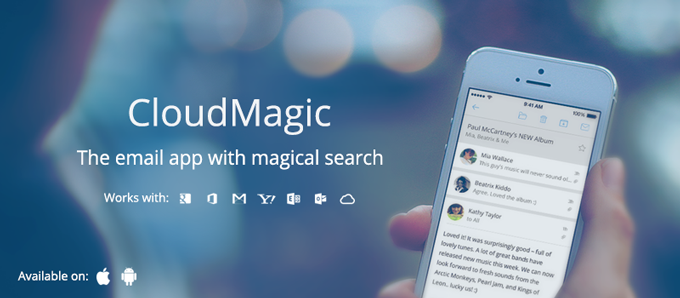
CloudMagic, Best Mail client for iOS and Android


iOS and Android has lot of mail apps in which some provide Good UI but lack in performance, some are good w.r.t it's feature but lack UI and some doesn't even suit to be called as Mail Clients. I am sure that you believe in what I just said. 

A friend of mine mentioned about CloudMagic Mail app some time during the end of October 2013 and I said, "Dude, all Mail clients are one and the same. It's better if I just stick with Gmail app"(Since I use only Gmails) After sometime, I thought let me give a try and headed to Play Store and searched for "CloudMagic". In the search results, first app which play store displayed was "CloudMagic - Free Mail App". Went ahead and installed it. After installation, it asked for login/Sign-Up. Since I already had an account which was previously associated with CloudMagic Search app, I just entered my credentials and logged in.

Wow!!! This was the first word which I said just by looking at the UI interface. As I started to look at all the features and facilities provided within the app, I was just saying 3 words. Wow!!!  Awesome!!!  and Beauty!!! Colours are just the way it is meant to be which makes it look clean and neat. No doubt why this app is currently in "Play Picks - Apps we love" section.

First thing which amazed me was the Search speed. I was running on 3G Aircel network when I did my first search. At first, I thought, network speed is brilliant but later realised that the speed with which the results are fetched are brilliantly fast and highly accurate. Best of all is, search across multiple accounts.

Next, Multiple Accounts. Gmail has already provided the feature of multiple accounts, but that is restricted only to Gmail, but this app provides facility to configure accounts of 8 different types. Earlier, they used to support max of 3 accounts and few days back, they increased it to 5.

All Inboxes My most loved feature. You can see all your configured mail accounts in the side drawer along with a special and most useful section "All Inboxes". It combines all mails from all of your accounts, arranges in decreasing order of time and differentiates mails of different accounts with different colours. You cannot customise the colour as of now. 

Default "From" address This comes handy if you have selected "All Inboxes". It provides facility for the end user to set "From" address in "From" field by default when composing a mail.

Passcode Lock No need of any third party apps to secure your mails from unauthorised user. You can set a passcode lock which will be prompted to user whenever app is opened.

CloudMagic has integrated all of the above and all the features which every mail app must have. Looking forward to have some more facilities/features like the following which makes user experience much more awesome.
  1. Swipe left and right to move/shift between mails.
  2. Color Customisation support to differentiate mails from multiple accounts.
  3. Report as spam.
  4. Zooming option within preview.

Download:

Have your ever tried CloudMagic Mail app? If not, then give a try. I am sure you will like it. Leave your comments below.

Is your smartphone smart enough? Try Tasker

I've been using Tasker for a while now and I'm completely convinced that it was worth the money I paid for. Kudos to the people who created it. 

If you've not tried it yet, you should try it now. They give a free trial if you download and install the apk from their website. If you want to buy it right away, you can find it on the Google Play. And don't back out on it's crappy UI, because what this app can do is going to stun you. 

Disclaimer: This app is for advanced users. For geeks and nerds. For the curious bunch who can carry out step-throughs and feel the 'Eureka' moment. 

In short, Tasker makes your smartphone a 'smart' phone. It is a powerful automation app that can save you some routine manual labor that you do every once in a while. You can tell Tasker to do some "if this then that" tasks on your phone. While what Tasker can do for you is bound only by your imagination, here is a list of some very simple Tasker profiles. 

If you are at home, switch on wifi. 
If you are sleeping, scale down data usage. 
If battery is low, decrease the screen brightness.
If you open Maps or Navigation, turn on GPS. 
If you plug in earphones, start the music app.
If you are driving, read new SMS for you.

These are some very basic things you can do with Tasker. If you explore further, you will realize that you can even create a complete RSS feed reader for yourself. In addition to the inherent power of Tasker, you can give a power-boost to Tasker with third party plugins to add extra features to the endless list of features that Tasker already provides. Trust me, this can replace a few apps if you can spend some time setting it up. 

But let's stick to the basics for now. I will show you how to create a very simple profile on Tasker to get you familiar with the terms you find in Tasker. 

If you plug in earphones then start the music app.

Well, I know it's lame as most music players already help you do this with one of their option. But the idea here is to get you familiar with the app. As you can clearly see it as one of those if-this-then-that task. Where this = you plug in your earphones and that = start the music app.

You need to know what are
  • Profiles
  • Contexts
  • Tasks
So let get started.

Profiles

One complete "if this then that" part makes one profile. Let's start by creating the first profile for you. 
Step 1: Click on the green + button at the bottom center. Give a name to your profile. Say, "Start music app when headset plugged in." Press OK to see a window of context. 

Contexts = this

Talking in the Tasker terms, the 'this' part is called a context. Context is the trigger, a condition that decides whether to execute or not the 'that' part. There are different type of contexts. Application, Time, Day, Location, State and Event contexts. For now let us concentrate on State contexts. State contexts are triggers that allows you to specify a particular state of your phone's hardware or state of an app that's installed on your phone. Here in this task, it is headset plugged in or not is a state. A hardware state. 
Step 2: Select 'State' as context. Different states are categorized into different categories. Select 'Hardware'. Select 'Headset Plugged'. Select Type to be 'Any'. 
Now you will be shown a dialog with all the Tasks you have.


Tasks = that

In Tasker terms, the 'that' part is called a Task. One task specifies a set of actions to be carried out. In your case loading the 'Music Player' app is a task. 
Step 3: Start by selecting 'New Task'. Name the task something like 'Load Music App' and press OK. 
You will be shown another dialog where you can Edit your tasks. This is where you specify the set of actions. For our current required profile, there is only one action. Load app.
Step 4: Press on the + button on bottom left of the dialog box. 
Actions are again categorized. 
Step 5: Select Category as App. Inside the category select 'Load app' as that's what your action is. 
A list of all the apps that are present on your phone will be shown. It may take a while to collect that info. But not more than 2 to 3 seconds. 
And finally, step 6: Select the Music app that you want to start when headset is plugged in. Leave all the other input fields like they were. Press Ok. Then you will see that action in your Task Edit dialog. At the bottom left there is a small triangular button like 'play' button. You can press it and see if your action's working. Press Ok. 
And there you are. You've just created your first Tasker Profile. Now that you know the basics you can start experimenting around. The Tasker wiki has some great collection of profiles if you want to try out. Let me know in comments on what you built using Tasker. 

Stay tuned for more Tasker profiles :) 

Programming on the go for Android with Android IDE

Yes. You're hearing it right. You can now develop applications for Android from your very own Android phone.

Text Editor of AIDE
AIDE is a Java integrated development environment for developing Android applications directly from your android phone. Developers can now write, compile, build and run the code directly from their phones. AIDE comes with a rich and well thought interface and adds most of the developer tools that you would use if you were running it on eclipse. AIDE has made best use of limited screen real estate to make it easy for developers to work on. AIDE provides features like error correction as you type, quick fixes, suggestions, syntax highlighting, code refactoring, project file manager, integrated logcat viewer and much more. It just takes one single click to create a sample code and start working on it. AIDE also supports .classpath files created by your Eclipse project. In lame language, you can just move the whole eclipse project to your phone without any hassle.

Integrated Logcat in IDE
AIDE doesn't just do things, it does things right. Even though compilation is a resource intensive task, AIDE works seamlessly without any lag. The text editor brings awesomeness with pinch-to-zoom and infinite undo-redo things.Even though AIDE is mainly aimed at tablets, it works fine on a smartphone. AIDE shows that the new generation smartphones are more than just fancy bird games.

It may not make sense to develop apps from scratch on a smartphone, but its compatibility with the eclipse project files bring some hope.

You can get it here on Google Play.

Samsung launches GALAXY tab 620

Samsung has added the GALAXY 620 to its line-up of tablets. The new member runs the Android 3.2 Honeycomb withTouchWiz UX customisation on top of it.

The tablet is powered by a 1.2 GHz dual-core CPU, with 1 GB of RAM. It features a 3 MP main camera capable of 720p video recording. Other bells and whistles include 16 GB of internal memory, microSD card slot, Wi-Fi, Bluetooth 3.0, and a 4000 mAh battery. The tablet is 0.4" (10 mm) thick, and weighs 345 grams.

The device has an IR remote function. According to Samsung, the tablet supports 1080p playback and DivX support out of the box. Since the device is DLNA-certified, you can mirror the screen on a compatible HDTV.

The GALAXY Tab 620 is priced at Rs. 30,250, but can be bought for Rs 26,000 via online stores.


India's 35$ Tablet finally announced. Named Aakash

Indian government's venture to create the cheapest tablet for students has finally been released. The much anticipated tablet is being manufactured by DataWind Ltd..

Government aims to provide 10000 tablets to students of India. Cost of each tablet is announced as Rs.2250 and is said to decrease in the coming days when Indian Government places an order for mass production of this. DataWind's Aakash is only for students and the price is subsidized. DataWind plans to release another version of Aakash, called UbiSlate which will be priced slightly higher than Aakash. DataWind claims to deliver UbiSlate by the end of November.

Ever since the announcement of 35$ Tablet, the processor speed was kept undisclosed. The processor speed turned out to be only 366Mhz. Considering the price of the tablet, this must not be disappointing as it is a value for money tablet. Here is a list of specifications to wrap up.

Aakash features -

a 7" display with resolution 800 x 480 pixels

a 366Mhz Processor

256 MB of RAM

2GB of internal

expandable up to 32 GB through microSD slot

1 standard USB 2.0 Port

Wifi Capability

Battery that lasts 3 hours and

runs Android 2.2 Froyo

Evidently, the tablet will not support HD graphics but the product is quite good for what it is aimed at. May be a disappointment to few people, but this is what you get for what you want to pay.

35$ tablet to be available from October 5th

Kapil Sibal, the Union resource minister of Human Resource unveiled the 35$ tablet on 22nd July 2010. Since then, techspace has been keeping track of the latest happenings regarding this cheapest 35$ tablet. The Government also announced a subsidized rate of Rs.1100 for students.


The 35$ tablet will be launched officially on October 5th. The device features a 7"  Touch screen, 2 USB Ports, 32 GB Hard Disk, 2 GB RAM with Video conferencing and multimedia capabilities. The tablet runs Android OS but the version is unknown. There has been no news on the processor speed and continues to remain a mystery until October 5th. The name of the tablet will be revealed on the day of launch. The tablet was supposed to release in the month of June but the tender with Manufacturers, HCL was cancelled causing the delay.

There are a few expectations on this tablet. If proven good, then this may bring lot of changes in the Indian education system.

Vodafone's Android phone - Vodafone Smart VF858

Vodafone has finally joined the race of affordable Android phones with Micromax and other manufacturers with the release of its new Vodafone Smart VF858. Vodafone Smart is powered with a 528Mhz ARM processor and runs Android 2.2 Froyo.


More features of Vodafone Smart VF858 -

  • TFT Capacitive Touch Screen, 256k Colors

  • 2.8" screen with 240 x 320 pixel screen resolution - 143 ppi pixel density

  • Accelerometer and Proximity sensors

  • 130 MB internal memory, expandable up to 32 GB through microSD

  • GPRS, EDGE, 3G (3.6 Mbps), Wi-Fi 802.11 b/g, Wifi - Hotspot

  • Price: Rs. 6,695


Vodafone Smart is priced Rs. 6,700.

Motorola Fire XT available in India now

Motorola Fire XT is not officially announced, but yet it is now available in India through Flipkart and InfiBeam. The Motorola Fire XT has refreshing looks and costs nearly Rs.12000 and the configurations match those of Samsung Galaxy Ace and HTC Salsa.


Features -

  • 800 MHz Processor

  • 512 MB RAM

  • Android v2.3 Gingerbread

  • 3.5 inch Capacitive HVGA Display with resolution 320 x 480 px

  • 5 MP Primary Camera

  • VGA secondary Camera

  • Wi-Fi, GPS, 3G

  • Bluetooth

  • 3.5mm Audio Jack


The price range for which the mobile comes is impressive and definitely a potential threat to other phones in that range.

Dual Core Android from Micromax - A85

Micromax has played big in the global and Indian market. Creating new records in making the most affordable phones is not new to it. Here's new Micromax A85, phone with dual core 1GHz processor and at a price rumored to be under Rs. 20,000. With this micromax becomes one of the few companies who have released dual core android phones in India with other players like LG and Samsung. The Micromax website doesn't hint anything and even the GSMArena still keeps the status as "Rumored". But the phone is sure to come out sooner or later and going to be a game changer for Micromax.


Micromax A85 will be third in Micromax's Android phone line up after the success of A60 and A70.


The Blurry image of Micromax A80. All that's available (leaked)


Here are some features rumored to come with Micromax A85 -


  • TFT Capacitive touch screen, 480 x 800 pixels with 247 ppi pixel density

  • Proximity and accelerometer sensors

  • 8 GB internal memory, 512 MB RAM, Externally extendable up to 32 GB

  • GPRS, EDGE, 3G (HSDPA,  HSUPA)

  • Bluetooth, micro USB v2.0

  • 5 MP Primary Camera - 2592 x 1944, autofocus

  • VGA Secondary Front Camera

  • Android Froyo v2.2

  • 1GHz NVIDIA Tegra 2 Dual Core Processor

  • Li-ion Standard Battery


Enthusiasts are very much looking forward for the release of this power packed device - Micromax A85

Philips unveils GoGear Connect 3 - A portable media player

Philips has unveiled the all new GoGear Connect 3 media player. Though called as a Portable Media Player, it can do much more than that.


GoGear Connect 3 PMP runs Android 2.3 Gingerbread operating system and comes with a touch sensitive 3.2" display. It is equipped with Android Market from where you can download from millions of application. It also has wifi and bluetooth support. You can surf the internet, download applications and much more.

Features of GoGear Connect 3 are similar to ipod touch and is sure to give a good competence. GoGear Connect 3 is expected to be priced at around $180.

Android Tablet for 99$

People once thought, in a country like India tablets can never click a good monopoly here. But they're proven wrong. Not just by ipad or samsung tablets, India is now being a competitive market for tablets. Even the Government of India has shown its support with the 35$ tablet, cheapest tablet in the world. But now, a not-so-known company called LACS has released a tablet named Magnum Pepper M74V for 99$. That would be around Rs. 4500.

Magnum Pepper M74V Specifications -
    7 inch LCD sensitive touch display (800*480)
    WIFI enabled
    Supports  10/100 BASE-T  Ethernet  LAN (RJ45)
    Support  USB 2.0
    Support Micro SD card (maximum 32 GB)
    3G compatible dongle
    3.5 mm stereo headset jack
    G- sensors 360  degree
    Front camera
    Built in 2GB memory
    Android 2.2 version
    Supported  audio formats  eg: MP3,AAC,WMA,AAC+
    Supported Video formats eg: 3GP, AVI, MP4, H.264,720P

Not many photos are available as of now. More details can be found on their website.


Stay tuned on Techspace for updates on Magnum Pepper.

i'm WATCH

Android Smart phone Watch "i'm :P"Guys, Think about this for a second, You wearing a android based phone on your wrist as a watch, How cool is that :P


It can actually be a reality, the image above shows a collection of random wrist watches which is also a android operated phone called "I'm", thats right its pronounced "I am". It comes in 2 versions- "I'm Color" (in white,black,red,yellow,green,light blue and pink) and "I'm Jewel" (in yellow, gold, pink gold, white gold and diamonds, titanium ,black gold). You can use the watch to do phone functions like making and receiving calls, text messages and as speakerphone for handsfree use. You can view Facebook, Twitter as well as photo gallery. The device features 1.54" colour TFT diplay, 4 GB of built-in storage, 64 MB of RAM and Bluetooth 2.1.If you think thats the best part, wait till you read this........ The watch can connect to both iPhone 4 and Android smart phone via Bluetooth. I'm Color starts at Approx Rs. 15,759 and I'm Jewel at Approx Rs. 37,930-76,094

Karbonn enters Android phone market with A1

Being open source, robust and free, no wonder Android is ruling the phone market. If on one side there are High end Android phones being sold for 30k range, there are lot of phones that rule the low-end market like the Micromax Andro A60. Just to add to this range, Karbonn has come up with this beautiful phone Karbonn A1 running Android 2.2.


Android A1 is equipped with the following features -


- Runs android 2.2


- 600 Mhz Processor


- 2.8 inch Capacitive Touch screen


- 3.2MP Camera


- 1100 mAh Battery


- GPS


- Memory expandable upto 32GB


- Connectivity through Bluetooth, Wifi, Wifi Hotspot and 3G(data only)


- Adobe Flash 10.1 version support


- Google Maps


The phone is available for a price of Rs. 6999 which is a little costlier than Android A60 but surely better than it. Karbonn will launch 3 other Android enabled smartphones with the release of Android A1. Whether Karbonn A1 is going to stand in the market is yet to be seen.

Hacker runs Android on IPhone


Iphone, here comes a bad news news for you. Hackers have started to work and integrate Android in Iphone. It has already been done by a Hacker David Wang. This is the tough time for you IPHONE.


Yes, what you read in above paragraph is true. David Wang a mobile phone hacker has come up with source and live demo of android working without any flaws on Iphone platform. This will surely put Iphone in trouble. He has originally dual-booted android and Iphone 's operating system in Iphone Mobile.


Here is the video demonstration of Android on Iphone mobile.


Iphone developers, wake up and start working on this. For some more hot news like these, please comment subscribe to our RSS FEEDS, FACEBOOK FAN PAGE and follow us on TWITTER.

SMSBackup - Save your SMS to your Gmail Inbox


SMSBackup is a software for your android that enables you to save your SMS into your Gmail inbox. Once you set it up, it automatically synchronizes your SMS messages to your GMAIL so that you can delete them from your capacity overloaded smartphone. This is helpful at times when the capacity of your Android is reaching the limits and you do not want to delete the SMSes at the moment. You just click and all your messages will be copied to your Gmail Inbox, both your inbox and the sent items.

To enable SMSBackup, you have to enable IMAP on your Gmail account settings. Here's how you do it.

Go to Mail Settings.

Go to 'Forwarding and POP/IMAP' tab.

Tick the 'Enable IMAP' checkbox.

Now you can just install the SMSBackup on your android and register it with your GMail and every SMS that you receive or send will be automatically synced to the cloud (GMail) and all this is done in the background.

The new Android Market boasts of more than a million apps. You can find SMSBackup and  you can download it from the Android market here.

For a much more detailed user manual, you can always go to the developer's website.

Download Google Maps for offline view- Android


Good news for Android users. Most of the users use google maps and get to the right place. Many users will not have internet facility in their mobiles once they go out of home or go out of network area. So for such people, here is a good news.


Android users can just have everything right in their hand. Once you enable this feature, it will automatically stored locally in the storage space. When you are in need, just open up and get the route without data connection.


How to enable and start using it?


  • Visit the Labs section of the Maps application using menu button.


  • Enable the Download Map Area option.


  • Hit the ‘More’ button and you will see an option to locally store a map of the surrounding area.


That's it. You are done. Now you can use it offline. Hurray. Please do share this article and like us on our Facebook Fan Page.

PayPal Phone to Phone NFC payment using Android Mobiles


Here is a good news for the all the people who do not want to carry wallets or credit cards along with them. Just an Android mobile will complete this work. This is a bit slower process but for sure, this will change the usage of mobiles and the world of technology to a greater extent.


How does it work?


Here is the answer for your question.


  • Person 1 begins a money send or money request via a homescreen widget.


  • Person 1 and 2 hold their NFC-enabled Android phones together until they vibrate.


  • Person 2 punches in their pin. Bhooooom!!! Money is transfered.


Right now only Nexus S mobile has this feature. Rest of the mobiles will soon get this feature in their mobiles.


Here is an video of it. Please do watch.


Android 2.3.4 for Samsung Galaxy S II


Here is the good news for the people who has Samsung Galaxy  S II because Android 2.3.4 version has been released for this mobile. New features includes better battery life, Google Chat and etc...


Steps to set up :-


  • Now install SuperCore with ODIN.


  • Now simply boot and upload DarkyROM2 zip to internal SD Card.


  • Now you have to reboot into recovery (vol-up+home+power).


  • Select the zip using recovery menu and install it.


  • Now simply reboot.


That's it.  Android 2.3.4 is up in your mobile. Isn't this a cool article?


Please like us on FACEBOOK and share this article.

TukTuk Meter: Save yourself from being overcharged

It is often seen in the metro cities of India, that you get an auto rickshaw or a cab to reach an unknown destination and you get exploited by a round-about trip by your rickshaw-wala just to overcharge you. Sometimes the tuktuk’s meter may be tampered to deceive you into paying more.. This does happen. But now with this new Tuk Tuk Meter, an application for your android/symbian/blackberry smartphone, you can save yourself some extra bucks.

Mindhelix Technologies has brought this new interesting app, called Tuk Tuk Meter which uses GPS to give you the route you’re being taken by. All you need to do is when you get on the auto, you have to press start. The Tuk Tuk Meter will start monitoring the route and display you the same. Once you reach the destination you can just stop it.

The Tuk Tuk meter will give you a summary on the route, distance and time. It also allows user to feed in the local fare charges. Once you set it, the application will also show you the fare of your total journey. This is similar to having your own meter while you board an auto rickshaw or cab.

Tuk Tuk meter is available free and can be downloaded from their website. The following snapshots will pretty much summarize the whole concept.


TukTuk SplashWhen you start

Hope this application just doesn’t die as like the previous ones that came in the market.

Get the new Android Market for your phone

Google has just announced the release of its new version of Android Market which is the version 3.0.26. Google said the new Android market will be rolled out with the new devices that are going to come. If you are an android owner and still waiting for the new version to hit your phone, then you’re probably missing all the fun. You can right away download this Android market from here and install it like any other application. The new android market has lot more applications and a whole new look. Here’s the video released by the Google -


New Android Market for Phones


<<Download link>>